It's been more than a year since the last entry and I've done more improvements to the implementation of Single Action Controller in TEAM.Commons.Web.
Most of the improvements have been around removing magic strings and using types instead.
The following gist shows some examples of what you get:
If you like type safety and finding errors at compile time rather than build time, you're going to love this approach, together with enabling view compilation.
On top of that I've also added some methods to help with testing of applications built with this library. This is how you verify that an action returns a View:
And this is how you check that an action returns a redirect to another Single Action Controller:
Showing posts with label TEAM.Commons. Show all posts
Showing posts with label TEAM.Commons. Show all posts
Monday, March 11, 2013


Sunday, January 29, 2012
Single Action Controller - Take 2
After almost a year of using the first version of Single Action Controllers over the ASP.NET MVC (http://rodolfograve.blogspot.com/2011/05/teamcommons-mvc-single-responsibility.html), I have applied a few improvements on it. I particularly didn't like the requirement to inherit from a custom class (SingleActionController), and the boilerplate code required in your Global.asax.
So, the current implementation (also available as a NuGet package at http://nuget.org/packages/TEAM.Commons.Web) doesn't require your controller class to inherit from SingleActionController but from the usual Controller class, and provides a helper method for Autofac users:
Global.asax:
protected void Application_Start()
{
  var builder = new ContainerBuilder();

  // Register your dependencies

  builder.RegisterTypesForSingleActionControllers(Assembly.GetExecutingAssembly(), "Base namespace of your controllers");
}
A controller:
using MyCompany.MyProject.ViewModels.Author;

// Name your namespace after your controller.
// This works very nicely with the directory structure you create in your project.
namespace MyCompany.MyProject.Controllers.Author
{
  // Name your class after your Action and make it inherit from the standard Controller
  public class Index : Controller
  {
    // One single action named Execute
    public ActionResult Execute(FilterDataModel filter) { ... }
  }
}
Saturday, May 14, 2011
TEAM.Commons: MVC + Single Responsibility Principle (SRP) = Single Action Controller
Since a long time ago I've been concerned about the increasing size and complexity of our ASP.NET MVC controllers: we have been clearly going against the Single Responsibility Principle.
UPDATE:
an improved version of this implementation is available here.Common controllers
This is some sample code to illustrate how one of our typical controllers looked like:
using MyCompany.MyProject.Models.Author;

namespace TEAM.MvcSACDemo.WebUI.Controllers
{

  public class AuthorsController : Controller
  {

    // Dependencies (smell: too many dependencies)
    protected readonly IDbSessionFactory DbSessionFactory;
    protected readonly IIndexQueries IndexQueries;
    protected readonly IEditQueries EditQueries;

    // Actions
    // Smells: too many methods; too many qualifications in the classes' names)
    public ActionResult Index(AuthorsFilterDataModel filter) { ... }

    public ActionResult Create() { ... }

    public ActionResult Insert(AuthorInsertDataModel newAuthor) { ... }

    public ActionResult Edit(long id) { ... }

    public ActionResult Update(AuthorUpdateDataModel) { ... }
  }
}
The violation of the Single Responsibility Principle should be obvious.
Our new approach
My initial thought was to change the rule we have been using to create a controller, which is one controller per entity, and find some other rule that produces more controllers with less actions while keeping or increasing the organization level.
A few days ago I stumbled on this post by Derek Greer, and immediately asked my friend Yaniel Díaz help me to develop this idea. After a couple of iterations we had a couple of classes and extension methods that will let us (and also you if you like) implement Single Action Controllers keeping must of the nice ASP.NET MVC conventions.
First, let's see how do Single Action Controllers look like:
using MyCompany.MyProject.Models.Author.Index;

// Name your namespace after your controller.
// This works very nicely with the directory structure you create in your project.
namespace TEAM.MvcSACDemo.Controllers.Author
{
  // Name your class after your Action and inherit from SingleActionController
  // You could choose to name it IndexAction instead
  public class Index : SingleActionController
  {
    // Only one dependency
    protected readonly IIndexQueries IndexQueries;

    // One single action (notice the use of namespace to remove extra qualification in the classes' names)
    public ActionResult Execute(FilterDataModel filter) { ... }
  }
}
And this is how it all looks in the Solution Explorer:

Except for the "Author" and "OtherEntity" nested folders, it's all like "traditional" MVC.
Using it in your application
All the required classes are available in the TEAM.Commons package under the TEAM.Commons.Web.MVC.SingleActionControllers namespace. TEAM.Commons is also available as a NuGet package, which is the preferred way to share code these days.
After you install TEAM.Commons in your solution (or copy the code you need), you must register your routes using the custom SingleActionControllerRoute:
public static void RegisterRoutes(RouteCollection routes)
{
  routes.IgnoreRoute("{resource}.axd/{*pathInfo}");
  // Best practice to avoid MVC handling the favicon request
  routes.IgnoreRoute("{*favicon}", new { favicon = @"(.*/)?favicon.ico(/.*)?" });

  // Only change the original MapRoute by our MapSingleActionControllersRoute
  routes.MapSingleActionControllersRoute(
    "Default",
    "{controller}/{action}/{id}",
    new { controller = "Author", action = "Index", id = UrlParameter.Optional },
    new { }
  );
}
and then register SingleActionControllersFactory as the ControllerFactory:
// You must pass the fully qualified name of the assembly
// and the namespace of the controllers.
// In future versions we'll simplify this step.
ControllerBuilder.Current.SetControllerFactory(new SingleActionControllerFactory(Assembly.GetExecutingAssembly().FullName, "TEAM.MvcSACDemo.Controllers"));
The internals
Thanks to ASP.NET MVC design we just had to implement a custom ControllerFactory, a custom Route and a custom base class for controllers.
Check the source code at the TEAM.Commons repository. It should be self-explanatory and could give you ideas about how to do it yourself in case you don't want to use TEAM.Commons.
Conclusions
The implemented solution is not perfect and I'm sure it could be improved, but we needed to go back to SRP in our controllers as soon as possible. I'll update this post when we find a new solution.
I hope you find this as useful as we do :-)
Monday, March 21, 2011
TEAM.Commons published as a NuGet Package
NuGet is a nice tool to share code (source or compiled).
I've published TEAM.Commons as a NuGet package in http://nuget.org/List/Packages/TEAM.Commons. With this step it's much easier to use this set of classes: just type Install-Package TEAM.Commons in your NuGet console.
I've published TEAM.Commons as a NuGet package in http://nuget.org/List/Packages/TEAM.Commons. With this step it's much easier to use this set of classes: just type Install-Package TEAM.Commons in your NuGet console.
Saturday, September 18, 2010
TEAM.Commons: Messaging
This is the 6th of several posts about TEAM.Common, a set of functionality I use in every project and that I'd like to share. The index is here: http://rodolfograve.blogspot.com/2010/09/teamcommons-introduction.html
Before talking about the details of TEAM.Commons.Threading I need to explain TEAM.Commons.Messaging, a set of classes about communication between processes based on the concept of transport.
There are two available implementations of these transports:
Remember, you can get all this code for free at bitbucket: http://bitbucket.org/rodolfograve/team.commons/overview
Check it out to get ideas, or simply use it as it is. It's working out for me and my team.
Before talking about the details of TEAM.Commons.Threading I need to explain TEAM.Commons.Messaging, a set of classes about communication between processes based on the concept of transport.
public interface ISendingTransport
{
    void Send(object message);
    void Send(object[] messages);
}
public interface IReceivingTransport
{
    // Blocks the current thread until a message is received.
    IList<object> WaitForMessageWithoutTimeout();

    /// Blocks the current thread until a message is received or timeout ellapses.
    IList<object> WaitForMessage(TimeSpan timeout);
}
There are two available implementations of these transports:
public class InProcessTransport : ISendingTransport, IReceivingTransport
{
...
}
This class implements both interfaces so that it can be used for communications between threads, handling all the related complexity. It's a very important piece used in the implementation of the advanced threading features in TEAM.Commons.Threading.MsmqSendingTransport
Send messages through an MSMQ Queue.
MsmqReceivingTransport
Receives messages from an MSMQ Queue.
Remember, you can get all this code for free at bitbucket: http://bitbucket.org/rodolfograve/team.commons/overview
Check it out to get ideas, or simply use it as it is. It's working out for me and my team.
TEAM.Commons: Threading - part 2
This is the 5th of several posts about TEAM.Common, a set of functionality I use in every project and that I'd like to share. The index is here: http://rodolfograve.blogspot.com/2010/09/teamcommons-introduction.html
In TEAM.Common.Threading you can find these abstractions:
With a very simple interface, ProducerConsumersProcess<T> coordinates the producer and the consumers using a buffer (an InProcessTransport, see next post) and handling a lot of edge cases and exceptions.
These are the foundations for all the good stuff. The rest are classes that help in the most common cases:
Remember, you can get all this code for free at bitbucket: http://bitbucket.org/rodolfograve/team.commons/overview
Check it out to get ideas, or simply use it as it is. It's working out for me and my team.
In TEAM.Common.Threading you can find these abstractions:
WorkerThread
A thread running a task in an "infinite" loop, until some other thread asks it to stop.
This is a very basic piece I use it all the time for implementing services and it's also the foundation for the "advanced" features.
public abstract class WorkerThread
{
 Exception Error { get; }
 void ForceStop();
 bool IsStopped { get; }
 void Start();
 void Stop();
 event EventHandler<System.ComponentModel.RunWorkerCompletedEventArgs> Stopped;
}
ProducerConsumersProcess
My approach to parallelization was to use the one producer -> several consumers technique:
You must create an instance of this class passing an instance of IProducer and a list of IConsumerWorker.
public class ProducerConsumersProcess<T>
{
    int ConsumedItemsCount { get; }
    int ProducedItemsCount { get; }
    void Start();
}
With a very simple interface, ProducerConsumersProcess<T> coordinates the producer and the consumers using a buffer (an InProcessTransport, see next post) and handling a lot of edge cases and exceptions.
public interface IProducer<T>
{
    T ProduceOne();
    bool HasFinished();
}
public interface IConsumerWorker<T>
{
    event EventHandler<RunWorkerCompletedEventArgs> Stopped;
    void Start(IReceivingTransport receivingTransport);
    void StopWhenStarved();
    void InterruptExecution();
    bool IsStopped { get; }
    int ProcessedItemsCount { get; }
    Exception Error { get; }
    string Id { get; }
}
These are the foundations for all the good stuff. The rest are classes that help in the most common cases:
DelegatedProducer<T>
Just pass two delegates:
public DelegatedProducer(Func<T> producerDelegate, Func<bool> hasFinishedDelegate)Combine it with lambda expressions and you have a very flexible and expressive syntax.
EnumeratorProducer<T>
Just pass an IEnumerable:
public EnumeratorProducer(IEnumerable<T> enumerableSource)Combine it with the yield operator and/or lambda expressions and again, you have a very flexible and expressive syntax.
EnumeratorProducer<T>
Just pass an IEnumerable:
public DelegatedConsumerWorker(string id, TimeSpan starvationTimeOut, int processedItemsCountMonitorizationStep, Action<T> consumerDelegate)You know what comes now: mix it with lambda expressions and...
Remember, you can get all this code for free at bitbucket: http://bitbucket.org/rodolfograve/team.commons/overview
Check it out to get ideas, or simply use it as it is. It's working out for me and my team.
TEAM.Commons: Threading - part 1
This is the 4th of several posts about TEAM.Common, a set of functionality I use in every project and that I'd like to share. The index is here: http://rodolfograve.blogspot.com/2010/09/teamcommons-introduction.html
(Multi)Threading is a complex, error prone task. You must take a lot of details into account everytime you're going to do it. On the other side, it's a very powerful tool and refusing to use it is not a valid solution. At least not if you want to do some large processings or interactive UIs.
AJAX (web), BackgroundWorker and Dispatcher (desktop), have solved the interactive UIs part (at least I feel comfortable enough with those these days), but I didn't feel the same about large processings that could be parallelized.
At some point I got tired of avoiding multithreading until there was no other option and got my self to implement some abstractions that would allow me and my team to implement parallel processes really, really quickly, with industry level robustness.
The result is TEAM.Commons.Threading. Next thing is an example so that you can decide if you like it and want to go on reading this post, or stop right here.
Output is:
If you run the code (TEAM.Commons.Threading.SampleConsole) you'll see how the execution pauses at some points. That's because the buffer gets emptied and the consumers are waiting for the producer to produce more items. In the real world you should adjust the parameters to avoid these pauses: buffer size, producer pause time when buffer is full, consumers pause time when buffer is empty.
Next post will be about the details of TEAM.Commons.Threading.
Remember, you can get all this code for free at bitbucket: http://bitbucket.org/rodolfograve/team.commons/overview
Check it out to get ideas, or simply use it as it is. It's working out for me and my team.
(Multi)Threading is a complex, error prone task. You must take a lot of details into account everytime you're going to do it. On the other side, it's a very powerful tool and refusing to use it is not a valid solution. At least not if you want to do some large processings or interactive UIs.
AJAX (web), BackgroundWorker and Dispatcher (desktop), have solved the interactive UIs part (at least I feel comfortable enough with those these days), but I didn't feel the same about large processings that could be parallelized.
At some point I got tired of avoiding multithreading until there was no other option and got my self to implement some abstractions that would allow me and my team to implement parallel processes really, really quickly, with industry level robustness.
The result is TEAM.Commons.Threading. Next thing is an example so that you can decide if you like it and want to go on reading this post, or stop right here.
// Create the list of consumers... we are creating 5 consumers for this example
var consumers = Enumerable.Range(1, 5).Select(x =>
        new DelegatedConsumerWorker<string>(
            "Consumer" + x.ToString(),
            TimeSpan.FromSeconds(1),
            2,
            item => Console.WriteLine("Processed: " + item)
        )).ToArray();

// Create a producer based on an IEnumerable of strings from "Item-01" to "Item-20".
var producer = new EnumeratorProducer<string>(Enumerable.Range(1, 20).Select(x => "Item-" + x.ToString("00")));

// Create the MainProcess... all the internal logic for parallelization is here.
ProducerConsumersProcess<string> p =
    new ProducerConsumersProcess<string>(
        producer,
        TimeSpan.FromMilliseconds(800),
        consumers,
        3);

// Start the process. This call blocks until the parallel process fails or ends.
p.Start();

Console.WriteLine("Process finished!");
Output is:
Processed: Item-01
Processed: Item-02
Processed: Item-03
Processed: Item-04
Processed: Item-05
Processed: Item-06
Processed: Item-08
Processed: Item-09
Processed: Item-07
Processed: Item-11
Processed: Item-12
Processed: Item-10
Processed: Item-14
Processed: Item-16
Processed: Item-17
Processed: Item-13
Processed: Item-15
Processed: Item-18
Processed: Item-19
Processed: Item-20
Process finished!
If you run the code (TEAM.Commons.Threading.SampleConsole) you'll see how the execution pauses at some points. That's because the buffer gets emptied and the consumers are waiting for the producer to produce more items. In the real world you should adjust the parameters to avoid these pauses: buffer size, producer pause time when buffer is full, consumers pause time when buffer is empty.
Next post will be about the details of TEAM.Commons.Threading.
Remember, you can get all this code for free at bitbucket: http://bitbucket.org/rodolfograve/team.commons/overview
Check it out to get ideas, or simply use it as it is. It's working out for me and my team.
TEAM.Commons: Formatting objects for human reading
This is the 3rd of several posts about TEAM.Common, a set of functionality I use in every project and that I'd like to share. The index is here:http://rodolfograve.blogspot.com/2010/09/teamcommons-introduction.html
Converting an arbitrary object into a human-readable string is something I need all the time, specially for logging.
TEAM.Commons has the PrettyFormat() extension method for the object class that performs this task. For an instance of a class like this:
The output of .PrettyFormat() would be:
As you can see, by default it will go down only 1 level . Properties beyond that level will be rendered as "-- EXCLUDED (Too deep) --". There is an overload to specify an arbitrary deepness: .PrettyFormat(10).
The PrettyFormat method handles a lot of special cases: enum, IEnumerable, DateTimes, string, int, etc, providing an appropiate format for these types. You don't want to see an string as:
but rather as:
Thanks to the "magic" of extension methods, you can even call it on null references, saving a lot of "if" instructions:
The output of the former code is: <NULL>
Remember, you can get all this code for free at bitbucket: http://bitbucket.org/rodolfograve/team.commons/overview
Check it out to get ideas, or simply use it as it is. It's working out for me and my team.
Converting an arbitrary object into a human-readable string is something I need all the time, specially for logging.
TEAM.Commons has the PrettyFormat() extension method for the object class that performs this task. For an instance of a class like this:
public class CyclicClass
{
    public int IntProperty { get; set; }
    public SimpleClass SimpleProperty { get; set; }
    public CyclicClass CyclicProperty { get; set; }
}
The output of .PrettyFormat() would be:
CyclicClass {
IntProperty='7',
SimpleProperty='SimpleClass {
 StringProperty='My string',
 IntProperty='5',
 DateProperty='3/2/2010 12:00:00 AM',
}',
CyclicProperty='CyclicClass {
 nIntProperty='7',
 SimpleProperty='SimpleClass {
  -- EXCLUDED (Too deep) --
 }',
  CyclicProperty='CyclicClass {
   -- EXCLUDED (Too deep) --
  }',
 }',
}
As you can see, by default it will go down only 1 level . Properties beyond that level will be rendered as "-- EXCLUDED (Too deep) --". There is an overload to specify an arbitrary deepness: .PrettyFormat(10).
The PrettyFormat method handles a lot of special cases: enum, IEnumerable, DateTimes, string, int, etc, providing an appropiate format for these types. You don't want to see an string as:
String {
 Length=14,
 Empty=...
}
but rather as:
The value of my string
Thanks to the "magic" of extension methods, you can even call it on null references, saving a lot of "if" instructions:
object o = null;
o.PrettyFormat();
The output of the former code is: <NULL>
Remember, you can get all this code for free at bitbucket: http://bitbucket.org/rodolfograve/team.commons/overview
Check it out to get ideas, or simply use it as it is. It's working out for me and my team.
Sunday, September 12, 2010
TEAM.Commons: Infrastructure for the Query part of CQRS (or just for querying)
This is the 2nd of several posts about TEAM.Common, a set of functionality I use in every project and that I'd like to share. The index is here: http://rodolfograve.blogspot.com/2010/09/teamcommons-introduction.html
It all started with some CQRS reading (Command and Query Responsibility Segregation).
The idea of having a separated model only for querying seemed very valuable even outside a "classic" CQRS implementation, so we started applying it everywhere using an architecture like:
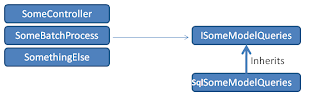
At this point, the implementation of the SqlSomeModelQueries was always something like this:
Obviously, after implementing this 3 times I decided I needed some infrastructure that will save us from repeating all this code over and over, with all the benefits that come with it.
You can find the complete implementation in https://bitbucket.org/rodolfograve/team.commons. Check the MapperExtensions and DbConnectionExtensions classes. Using this infrastructure the code above is:
There are many details you must take into account if you want to do this by yourself:
Remember, you can get all this code for free at bitbucket: http://bitbucket.org/rodolfograve/team.commons/overview
Check it out to get ideas, or simply use it as it is. It's working out for me and my team.
It all started with some CQRS reading (Command and Query Responsibility Segregation).
The idea of having a separated model only for querying seemed very valuable even outside a "classic" CQRS implementation, so we started applying it everywhere using an architecture like:

At this point, the implementation of the SqlSomeModelQueries was always something like this:
public IEnumerable<somemodel> GetAllWithCondition(string condition1, int condition2)
{
  using (var connection = new SqlConnection(ConnectionString))
  {
    var cmd = connection.CreateCommand("select A, B, C, ... from T1 inner join T2 ... where ...");
    using (var reader = cmd.ExecuteReader())
    {
      while (reader.Read())
      {
        SomeModel result = new SomeModel()
        {
          // Missing null checkings, safe conversions, etc
          A = Convert.ToInt32(reader["A"].GetValue()),
          B = Convert.ToString(reader["B"].GetValue())
          // ... More properties
        };
        yield return result; // We don't want to keep all the items in memory.
      }
    }
  }
}
Obviously, after implementing this 3 times I decided I needed some infrastructure that will save us from repeating all this code over and over, with all the benefits that come with it.
You can find the complete implementation in https://bitbucket.org/rodolfograve/team.commons. Check the MapperExtensions and DbConnectionExtensions classes. Using this infrastructure the code above is:
public IEnumerable<SomeModel> GetAllWithCondition(string condition1, int condition2)
{
  using (var connection = new SqlConnection(ConnectionString))
  {
    foreach (var item in connection.GetAllWithStreaming<SomeModel>("select A, B, C, ... from T1 inner join T2 ... where ..."))
    // There is an overload to pass an SqlCommand in case you need to use an SqlCommand with parameters.
    {
      yield return item;
    }
  }
}
There are many details you must take into account if you want to do this by yourself:
- Reflection is always very tricky to get right.
- Reflection is slow, so use something like Fasterflect and its cache features.
- There are a lot of special cases.
- You should add as much information as possible in the exception messages.
Remember, you can get all this code for free at bitbucket: http://bitbucket.org/rodolfograve/team.commons/overview
Check it out to get ideas, or simply use it as it is. It's working out for me and my team.
TEAM.Commons: Introduction
This is the 1st of several posts about TEAM.Common, a set of functionality I use in every project and that I'd like to share.
For some time I've been trying to organize, stabilize and share some common code I use in all my projects and that I find myself copying over and over.
This code matures with me and it will be nice to keep some part of my evolution as a developer in this code's history.
Last time I published what I called Romialyo SDK. Since then I have already made some improvements and stopped using git in favor of Mercurial, so here is the new TEAM.Commons.
I'll try to blog about it because I feel there are many things in there that could be used by many people and more importantly, I'd love to get some feedback on this code because it contains what I feel are the best things I've coded.
Any improvement on this code will be a direct improvement on my abilities.
Remember, you can get all this code for free at bitbucket: http://bitbucket.org/rodolfograve/team.commons/overview
Check it out to get ideas, or simply use it as it is. It's working out for me and my team.
- Querying.
- Formatting objects into readable strings.
- Threading - part 1 (introduction)
- Threading - part 2 (parallelization)
- Messaging (in-process and inter-process)
For some time I've been trying to organize, stabilize and share some common code I use in all my projects and that I find myself copying over and over.
This code matures with me and it will be nice to keep some part of my evolution as a developer in this code's history.
Last time I published what I called Romialyo SDK. Since then I have already made some improvements and stopped using git in favor of Mercurial, so here is the new TEAM.Commons.
I'll try to blog about it because I feel there are many things in there that could be used by many people and more importantly, I'd love to get some feedback on this code because it contains what I feel are the best things I've coded.
Any improvement on this code will be a direct improvement on my abilities.
Remember, you can get all this code for free at bitbucket: http://bitbucket.org/rodolfograve/team.commons/overview
Check it out to get ideas, or simply use it as it is. It's working out for me and my team.
Subscribe to:
Posts (Atom)